
If you’ve ever heard someone say, “Check your robots.txt file,” it probably sounded technical and slightly intimidating.
It doesn’t need to be.
The robots.txt file is simply a set of instructions that tells search engines which parts of your website they’re allowed to access.
Used correctly, it helps search engines understand your site.
Used carelessly, it can quietly block important pages from being discovered.
This post explains:
- what robots.txt actually does
- how it relates to crawlers and SEO
- and what business owners should (and shouldn’t) worry about
No deep developer knowledge required.
First: what are robots and crawlers?
When people talk about “robots” in SEO, they’re not talking about AI taking over your site.
They’re referring to automated programs—often called crawlers or bots—that scan websites to understand their content.
For example, Google uses Googlebot to crawl websites and decide what to index in search results.
Crawlers:
- visit pages
- follow links
- read content
- interpret structure
They don’t see your site the way humans do. They follow rules. One of those rules lives in your robots.txt file.
What the robots.txt file actually is
The robots.txt file is a small text file located at the root of your website (example: yoursite.com/robots.txt).
Its job is simple:
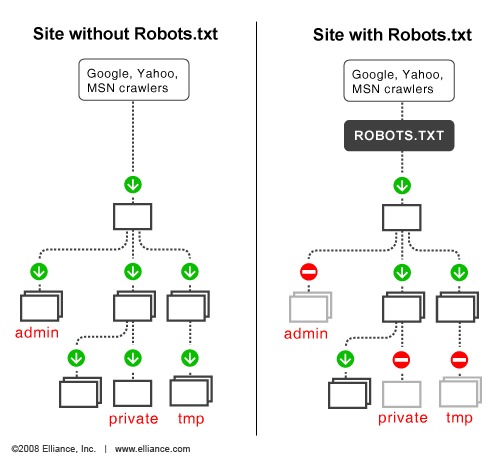
It tells crawlers which areas of your site they are allowed, or not allowed, to access.
Think of it as a sign at the entrance of your site that says:
- “You can enter here.”
- “Please don’t go into this section.”
It doesn’t guarantee compliance, but reputable search engines respect it.
What robots.txt is commonly used for
A robots.txt file is typically used to:
- Prevent search engines from crawling admin areas
- Block duplicate or low-value pages
- Manage crawl budget on larger sites
- Point crawlers to your sitemap
It is not usually used to hide sensitive information. If something must be private, it should be protected properly, not just “disallowed.”
Visual: How robots.txt interacts with crawlers
A common misconception about robots.txt
Many people assume:
“If I block a page in robots.txt, it won’t appear in search results.”
Not necessarily. Robots.txt controls crawling, not indexing.
If other sites link to a blocked page, search engines may still list the URL—just without detailed content.
This is where confusion often starts. Blocking something incorrectly can accidentally prevent important pages from being discovered.
When robots.txt matters (and when it doesn’t)
For small, well-structured websites, robots.txt is usually straightforward and stable.
You likely don’t need a complex configuration if:
- your site is cleanly structured
- you don’t have massive duplicate content
- you aren’t running complex parameters or search filters
Where robots.txt becomes more critical:
- large ecommerce sites
- sites with thousands of dynamic URLs
- migrations and major restructures
In most cases, clarity of structure matters more than clever blocking.
How this fits into SEO
Search engine optimization (SEO) is about helping search engines understand your site clearly.
Robots.txt plays a small but important role in that ecosystem.
It helps:
- guide crawlers efficiently
- prevent wasted attention on irrelevant pages
- reinforce intentional structure
But it is not a growth lever by itself.
If your content is unclear, blocking pages won’t fix that. If your structure is messy, robots.txt won’t save it.
Architecture comes first.
Platforms and robots.txt
Modern platforms like Webflow generate a default robots.txt file automatically. This handles most standard needs.
However, when launching new sections, migrating content, or making structural changes, it’s worth reviewing the file to ensure nothing important is accidentally restricted.
Small configuration changes can have outsized impact.
The bigger picture most people miss
Robots.txt is not a trick. It’s not an SEO hack.
It’s simply a communication layer between your website and search engines.
When your site architecture is clear, robots.txt supports that clarity.
When your site is chaotic, robots.txt often becomes a patch.
The file itself is rarely the real problem.
The structure underneath it usually is.
If you’re unsure whether yours is set up correctly
Many sites either:
- ignore robots.txt entirely
- or block things they don’t fully understand
If you’re not sure whether your site’s crawl rules align with your actual goals, that’s worth reviewing.
I regularly break down real website structures, how search engines interpret them and where simple configuration mistakes create friction, inside my email notes.
If that would be useful, you can join here:
https://add.wisewebops.com
No pressure. Just clarity.