
Images affect more than just how your website looks.
They influence:
- page speed
- user experience
- mobile performance
- and even how professional your site feels
But many people upload images without thinking about file format at all. That’s where the PNG vs. JPG question comes in.
Neither format is universally “better.” Each is optimized for different situations, and choosing the wrong one can quietly slow down your site or reduce image quality.
This post explains:
- the difference between PNG and JPG
- where each format works best
- and how to make smarter image decisions for your website
No design or technical background required.
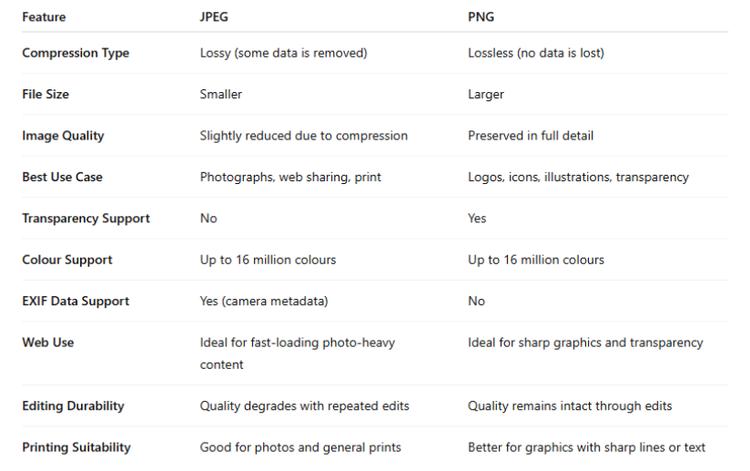
The simple difference between PNG and JPG
At a high level:
- JPGs are optimized for smaller file sizes
- PNGs are optimized for image clarity and transparency
That’s the core tradeoff.
JPGs usually load faster because they compress images more aggressively. PNGs preserve more detail but tend to create larger files.
When JPG works best
JPG (or JPEG) is typically the best choice for:
- photographs
- lifestyle images
- team photos
- large background visuals
Because JPG files are smaller, they help pages load faster—especially on mobile devices.
This makes JPG a strong default option for most content-heavy websites.
When PNG works best
PNG is usually the better choice for:
- logos
- icons
- graphics with text
- screenshots
- images that need transparent backgrounds
PNG preserves sharp edges and clarity better than JPG.
That’s why logos saved as JPGs often look blurry or compressed.
The tradeoff most people miss
Choosing the wrong format usually creates one of two problems:
- The image looks bad
- The page loads slowly
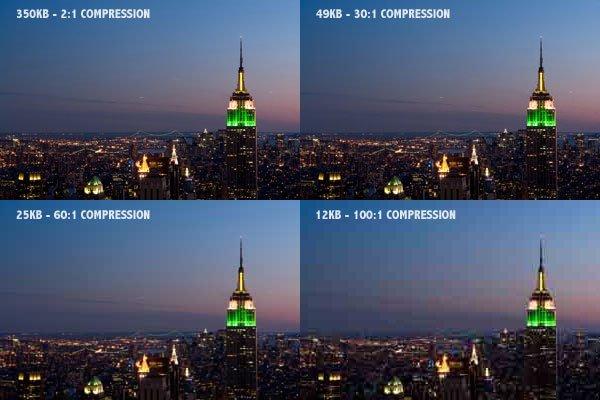
Large PNG files are one of the most common reasons websites become unnecessarily heavy.
Meanwhile, overly compressed JPGs can make a site feel low quality—even if the design itself is solid.
The goal is balance.
Visual quality vs website performance

A good website doesn’t just look good on your laptop, it also needs to load quickly for real users on real devices.
That’s why image optimization matters.
In many cases:
- a slightly smaller image that loads quickly is better than a perfect image that slows the site down
- clarity matters most where users actually notice it
Common mistakes website owners make
Uploading massive PNG files
This is extremely common.
People export large graphics as PNGs because they look sharper—but the file sizes can become enormous.
Using JPG for logos and graphics
JPG compression can make logos:
- blurry
- fuzzy around edges
- less professional-looking
Graphics with text are especially vulnerable.
Ignoring mobile performance
Images that seem “fine” on desktop can dramatically slow mobile loading times.
And slower sites often create:
- higher bounce rates
- lower engagement
- less trust
A practical rule of thumb
If the image is:
- a photo → start with JPG
- a logo or graphic → start with PNG
Then optimize from there.
You do not need perfection.
You need reasonable image quality without unnecessary weight.
Modern websites use multiple formats
Today, many websites use a mix of formats depending on context.
Platforms like Webflow help automate some optimization, but image choices still matter.
The strongest sites treat images as part of performance strategy—not just decoration.
The bigger takeaway
Image formats are less about design theory and more about user experience.
The right format:
- keeps your site fast
- preserves visual clarity
- reduces friction for visitors
And like most web decisions, simpler and more intentional choices usually work best.
Want help improving your website performance?
I regularly share practical website breakdowns—what slows sites down, what improves user experience, and what changes actually matter—inside my email notes and sprint demos.
If you want those, you can join here:
https://add.wisewebops.com
No pressure. Just useful insights.